 WOWOW Faucets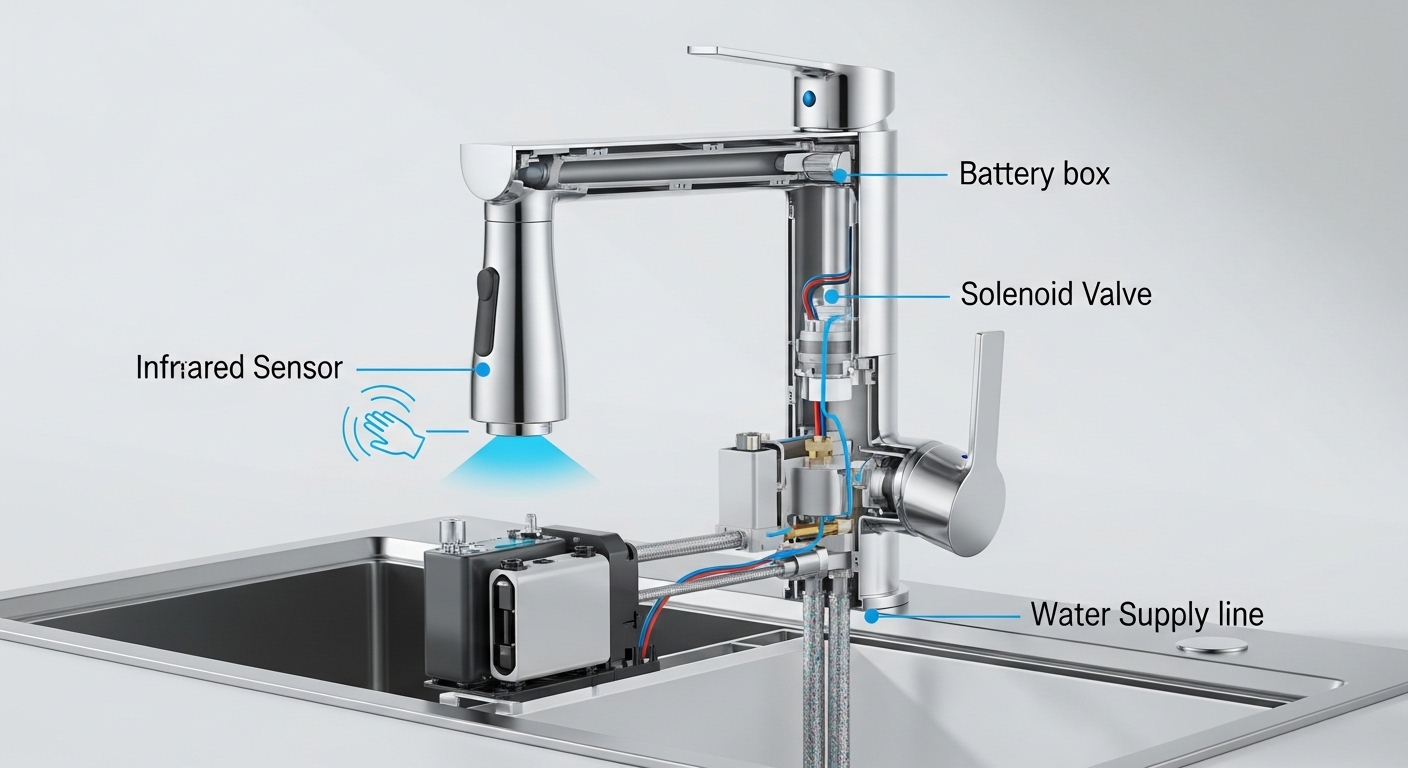
If your touchless faucet not working has you waving your hands at the spout like you’re casting a spell, take a breath — you almost certainly don’t need a plumber, and you almost certainly don’t need a new faucet. A motion-sensor faucet is really just three parts working together: a sensor that sees your hand, a battery pack or transformer that supplies power, and a solenoid valve that opens and closes the water. When the faucet “dies,” one of those three links has broken, and you can usually find which one in a few minutes with no tools.
This guide walks through every common failure in the order a real technician checks them — cheapest and most likely first — so you stop the trial-and-error and get your water back. We’ll cover the no-power faucet, the faucet that runs nonstop, the one that’s slow or weak, and when it’s genuinely time to call for warranty service.
Why did my touchless faucet suddenly stop working?
Nine times out of ten it’s the batteries. Touchless faucets sip power 24/7 to keep the sensor “awake,” and most battery packs last 12–24 months — so a faucet that worked yesterday and is dead today is usually just out of juice. The second most common culprit is a loose connection between the sensor cable, the battery box, and the solenoid valve, which can wiggle free from sink vibration over time.
Here’s the quick mental model: power gets to the sensor → sensor sees your hand → sensor tells the solenoid to open → water flows. If any one of those handoffs fails, you get no water. So you diagnose by walking that chain from the power source outward.
Most sensor faucets give you a clue before they quit. Watch the little LED light behind the spout or near the sensor window:
- No light at all when you wave — power problem. Batteries or connections. Start here.
- Light blinks/flashes when idle — low-battery warning. The faucet is telling you to swap batteries before it dies completely.
- Light comes on when you wave but no water — power and sensor are fine; the solenoid valve or the supply side (shutoff valve, clogged filter) is the issue.
- Water runs and won’t shut off — usually a stuck solenoid or a sensor seeing a reflective surface. Different fix, covered below.
How do I fix a touchless faucet that has no power or no light?
Replace the batteries first, then reseat every connector — that’s the fix for the large majority of dead touchless faucets. Don’t overthink it before you’ve done these two things.
Work through this in order and stop as soon as the water comes back:
- Find and open the control/battery box. It’s mounted under the sink, usually clipped to the cabinet wall or hanging on the supply lines. It’s a plastic box about the size of a deck of cards.
- Replace ALL the batteries with fresh name-brand alkalines. Most packs use 4 or 6 AA batteries. Don’t mix old and new, and don’t reuse “they were kind of new” batteries — a single weak cell drags the whole pack below the voltage the solenoid needs to fire. This alone solves the majority of cases.
- Check battery orientation and clean the contacts. Make sure every cell faces the right way, and look for white or greenish corrosion on the metal terminals. Corrosion blocks current even with brand-new batteries — scrub it off with a cotton swab and a little white vinegar or fine sandpaper, then dry it.
- Reseat every cable connector. There are usually two or three plugs: sensor-to-control-box and control-box-to-solenoid. Unplug each one and firmly click it back together. A connector that’s 90% seated will pass the visual test but block the signal.
- If it’s an AC (plug-in) model, check the outlet. Confirm the transformer is fully plugged in, the outlet isn’t on a switch that got flipped, and the GFCI on a nearby outlet hasn’t tripped. Press “Reset” on the GFCI.
One detail people miss: after fresh batteries, give the faucet a hard reset by unplugging the solenoid connector for about 60 seconds, then reconnecting. The control electronics need to re-initialize and “learn” the sensor range again. Many faucets that still act dead right after a battery swap come back to life after this reset.
How long do touchless faucet batteries actually last?
Expect 12 to 24 months from a set of AA alkalines under normal household use — a busy kitchen faucet used dozens of times a day lands at the shorter end, a guest bathroom at the longer end. Lithium AA batteries last noticeably longer and resist the cold-weather voltage drop, which matters if your control box is in an unheated cabinet on an exterior wall. If you’re swapping batteries every few months, that’s a red flag: a stuck-partially-open solenoid or an oversensitive sensor that keeps cycling can drain a pack fast, so treat short battery life as a symptom, not just an annoyance.
Why does my touchless faucet run nonstop or turn on by itself?
A touchless faucet that won’t shut off, or that switches on with nobody there, is almost always a sensor being “fooled” or a solenoid stuck open. The fix is usually cleaning the sensor window and removing whatever shiny or moving object is in its field of view — no parts required.
Infrared sensors work by bouncing invisible light off your hand and reading the reflection. Anything that constantly reflects that light reads as a permanent “hand”:
- A shiny pot, a stainless steel pan, or a chrome dish left directly under the spout.
- A water droplet, soap film, or hard-water haze on the sensor window itself.
- Direct sunlight or a bright light fixture hitting the sensor at the wrong angle.
- A dangling dish towel or sponge swinging in and out of the detection zone.
Start by wiping the sensor window with a soft, damp cloth — never an abrasive pad, which scratches the lens and permanently scatters the IR beam. Clear the sink area, then test. If it still runs continuously with nothing in front of it, the solenoid valve is likely stuck open from mineral debris. Unplug the solenoid connector: if the water stops the instant you disconnect it, the valve is mechanically stuck and needs cleaning or replacing; if water keeps flowing even unplugged, the manual mixing valve or a separate issue is involved. Many faucets also have a manual override or temperature lever — make sure it didn’t get bumped into a locked-on position.
My touchless faucet has weak flow or won’t get hot — what’s wrong?
Weak or inconsistent flow on a sensor faucet is rarely the electronics — it’s almost always a clogged aerator, a partly closed shutoff valve, or a debris-blocked solenoid screen. The sensor is opening the valve fine; something downstream is choking the water.
Check these in order:
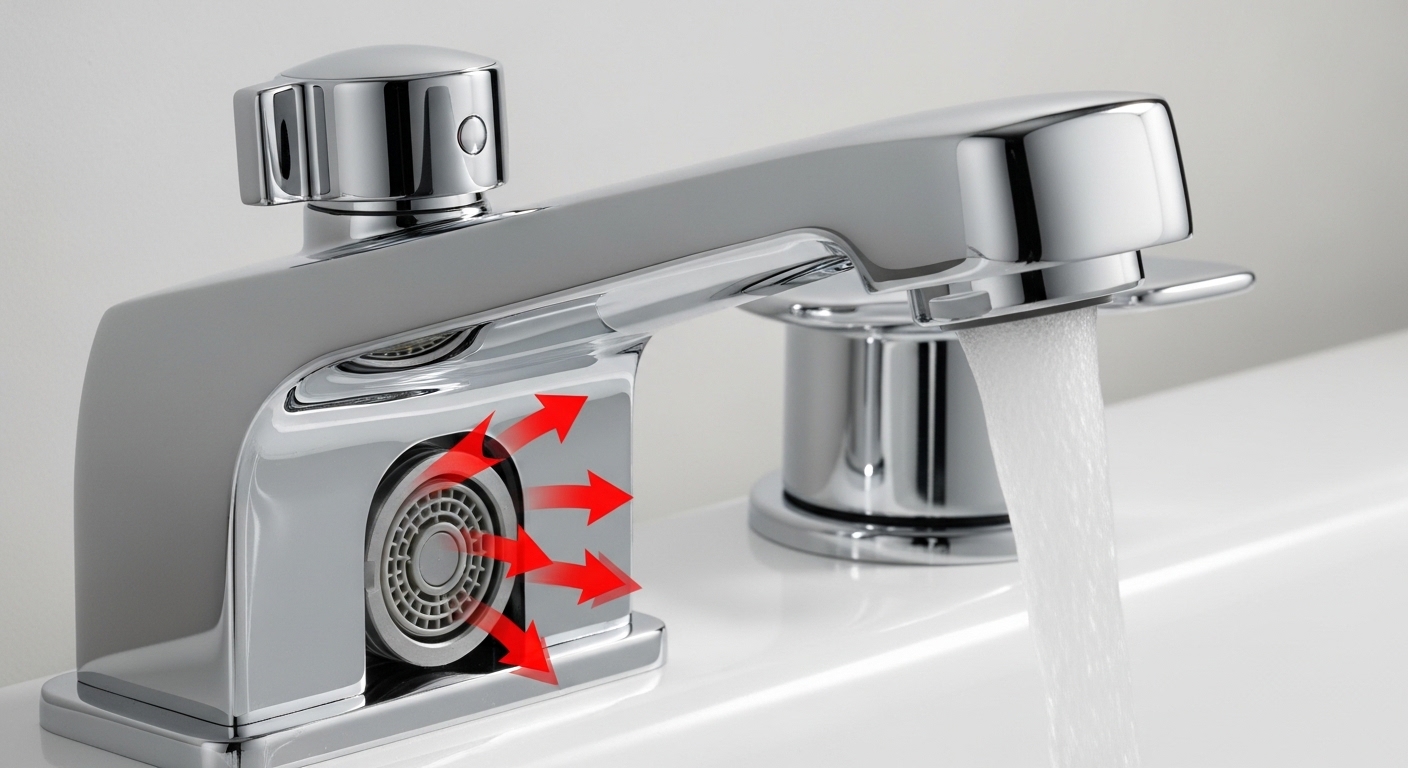
- Aerator. Unscrew the tip of the spout and rinse out the mesh screen. Limescale and grit collect here first and cut flow dramatically.
- Supply shutoff valves. Under the sink, make sure both the hot and cold angle stops are fully open. A half-closed valve — common after recent plumbing work — throttles flow and can also explain why you only get lukewarm water.
- Solenoid inlet filter. Most solenoids have a tiny mesh screen at the inlet that catches sediment. Shut off the supply, disconnect the line, and rinse the screen.
- Temperature mixer. Touchless faucets set temperature with a separate handle or an under-sink mixing valve, not the sensor. If you get no hot water, that mixer or the hot-side shutoff is the place to look — the sensor only controls on/off.
If your water has always run weak or comes and goes regardless of the sensor, the root cause may be household-wide rather than the faucet itself. Our breakdown of why your faucet water is inconsistent walks through pressure and supply issues, and if buildup is the suspect, the same limescale that clogs aerators also coats sensor windows — the cleaning steps in our guide to removing limescale and buildup easily apply directly here.
Touchless faucet troubleshooting: symptom-to-fix cheat sheet
Use this table to jump straight to the likely cause based on what your faucet is actually doing. Work top to bottom — the most common, cheapest fixes are listed first within each symptom.
| Symptom | Most likely cause | First thing to try | DIY time |
|---|---|---|---|
| No water, no LED light | Dead batteries / lost power | Replace all batteries, reseat connectors, reset solenoid 60s | 5–10 min |
| LED blinks when idle | Low battery warning | Swap in fresh batteries before it dies | 5 min |
| Light responds, no water | Stuck solenoid or closed shutoff | Open angle stops, clean/reset solenoid | 10–20 min |
| Runs nonstop / turns on alone | Sensor fooled or solenoid stuck open | Clean sensor window, clear shiny objects from sink | 5 min |
| Weak or sputtering flow | Clogged aerator or inlet screen | Clean aerator and solenoid inlet filter | 10–15 min |
| No hot water only | Mixing valve or hot shutoff | Open hot angle stop, check under-sink mixer | 10 min |
| Slow or laggy response | Dirty sensor or weakening batteries | Wipe sensor, replace batteries | 5 min |
When should I replace the solenoid valve or the whole faucet?
Replace the solenoid valve when the sensor and power are confirmed good but the valve won’t open or close even after cleaning — and replace the whole faucet only when the body is cracked, the finish is failing, or repair parts are no longer available for an old discontinued model. A solenoid is a cheap, swappable part; the faucet body almost never needs replacing for a sensor problem.
Here’s how to confirm the solenoid is the bad part before you buy one. With fresh batteries installed and the LED responding normally to your hand, listen and feel for a soft “click” at the solenoid each time you wave. That click is the valve trying to actuate. If you get a click but no water, the valve is mechanically stuck or the supply is blocked. If you get no click at all — but the sensor light works — the solenoid coil has failed and the part needs replacing. Most manufacturers sell the solenoid as a standalone replacement that connects with the same plug-in connectors, so it’s a 15-minute swap with no soldering.
Genuinely dead faucet bodies are rare. If yours is more than 8–10 years old, has visible cracks in the base, or the brand has vanished and no parts exist, replacement makes sense — and at that point it’s worth choosing a current model with readily available solenoids and sensor modules. When you do swap the unit, the under-sink connections are nearly identical to a standard pull-down install; our step-by-step guide to installing a kitchen faucet covers the supply lines and mounting, and you simply add the battery box and solenoid to the chain.
Is that clicking sound normal on a touchless faucet?
A single soft click when the water starts and stops is completely normal — that’s the solenoid valve opening and closing, and it’s the sound you actually want to hear. What’s not normal is rapid repeated clicking, a buzzing solenoid, or clicking with no water, which usually points to a weak battery pack that can’t hold the valve open or a valve straining against debris. If your faucet has started making unusual repetitive noises, our guide to a faucet making clicking sounds breaks down which noises are harmless and which signal a real fault.
A quick prevention checklist so it doesn’t happen again
The fastest way to never deal with a dead sensor faucet is to get ahead of the two things that kill them: weak power and mineral buildup. A five-minute routine twice a year does it.
- Mark your calendar to replace batteries every 12 months whether they’ve died or not — cheaper than a surprise no-water morning. Use lithium AAs in cold cabinets.
- Wipe the sensor window monthly with a soft damp cloth to keep hard-water haze from slowing detection.
- Clean the aerator quarterly if you have hard water, so flow stays strong and the solenoid isn’t fighting back-pressure.
- Keep shiny pans and hanging towels out of the spout’s direct line of sight to prevent phantom activations that drain batteries.
- Don’t ignore the blinking LED — that’s your free early warning. Swap batteries at the first flash, not after the faucet quits.
FAQ
Why is my touchless faucet not working right after I changed the batteries?
The control board needs to re-initialize. Unplug the solenoid connector for about 60 seconds, then reconnect it — this forces the faucet to recalibrate its sensor range. Also double-check that you used all fresh batteries (not a mix of old and new) and that none are reversed. Mixing one weak cell with new ones is the most common reason a “new battery” swap still leaves the faucet dead.
Can I use my touchless faucet manually when the sensor is broken?
Often yes. Most touchless kitchen and bathroom faucets have a manual handle or lever that controls temperature and provides on/off override, so you can run water the old-fashioned way while you sort out the sensor. Look for a small lever at the base or side of the faucet. If your model is purely sensor-operated with no manual control, you’ll need power restored before it works at all — another reason to keep spare batteries on hand.
Do touchless faucets work without power during an outage?
Battery-powered models keep working in a power outage because they run on AA batteries, not your home’s electricity. Plug-in (AC transformer) models will stop during an outage unless they have a battery backup. If reliability during outages matters to you, choose a battery-operated model or one with both AC power and a battery fallback.
How do I clean the sensor on a touchless faucet without damaging it?
Use a soft microfiber cloth dampened with water or a 50/50 white vinegar solution for stubborn limescale, then wipe dry. Never use abrasive pads, scouring powder, or harsh chemical cleaners — they scratch or cloud the infrared lens, which permanently scatters the beam and makes the sensor slow or unreliable. Gentle and regular beats aggressive and occasional.
Is it worth repairing a touchless faucet or should I just buy a new one?
Repair is almost always worth it. The two parts that fail — the battery pack and the solenoid valve — are inexpensive and connect with plug-in connectors, so a repair is usually a 10–15 minute job with no plumbing skills required. Replace the whole faucet only if the body is cracked, the finish has failed, or it’s an old discontinued model with no available parts. A working faucet with a dead sensor is a cheap fix, not a write-off.
Why does my touchless faucet keep draining batteries so fast?
Fast battery drain usually means the faucet is activating far more than it should. Check for shiny objects, hanging towels, or direct light tricking the sensor into firing repeatedly, and clean a hazy sensor window that may be causing false reads. A solenoid that’s stuck partially open also forces constant power draw. If you fix those and batteries still die within a few months, the control module may be faulty and worth a warranty claim.
About the author: This guide was written by the WOWOW Faucet product and technical team, drawing on hands-on bench testing and field repairs of motion-sensor kitchen and bathroom faucets. We’ve diagnosed these failures across hundreds of units, which is why the steps here are ordered the way a real technician actually checks them — cheapest and most likely first.
About WOWOW Faucet: WOWOW designs and manufactures kitchen and bathroom faucets, shower systems, and fixtures with a focus on durable lead-free brass bodies and reliable internal components. Our touchless and pull-down faucets are tested to meet North American plumbing standards (including cUPC certification and lead-free compliance), and our sensor faucets are backed by a manufacturer’s limited warranty covering the electronic module and finish — so if a solenoid or sensor fails within the warranty period, replacement parts are available rather than forcing a full faucet swap.