 WOWOW Faucets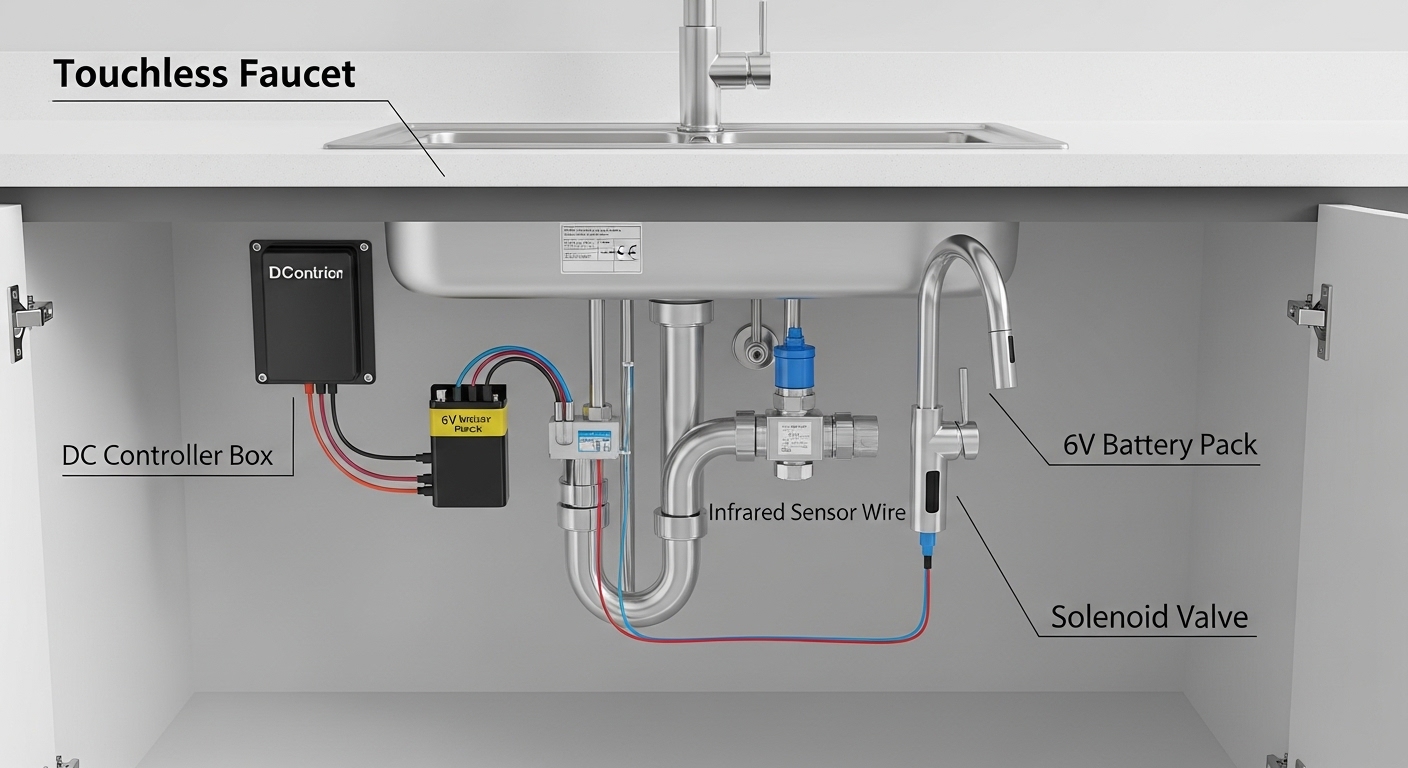
If you’ve been shopping for a hands-free kitchen or bathroom faucet, you’ve probably hit the phrase touchless faucet (controller dc) in product specs and wondered what the “DC” part actually means for you. In plain terms: the “controller DC” is the little black control box that hides under your sink. It holds the batteries, the circuit board, and the connection to the infrared sensor and the solenoid valve. “DC” means it runs on low-voltage direct current — the same safe, quiet power a TV remote uses — instead of being wired into your home’s 110V/120V AC mains. That single design choice is why a DC touchless faucet is so easy to install yourself and so popular in homes rather than airports.
Below, I’ll answer the real questions buyers actually ask before they spend the money: how it’s powered, how long the batteries last, whether DC or AC is better for a home, what to check before you buy, and how to install and troubleshoot one. I sell and test these for a living, so I’ll keep it concrete — actual specs, voltages, and dollar figures, not vague marketing.
What does “controller DC” actually mean on a touchless faucet?
“Controller DC” means the faucet’s control module is powered by low-voltage direct current — almost always a 6V battery pack (4× AA or 4× C cells) or a 6V DC plug-in adapter — rather than your home’s AC wiring. The controller is the brain; everything else takes its orders from it.
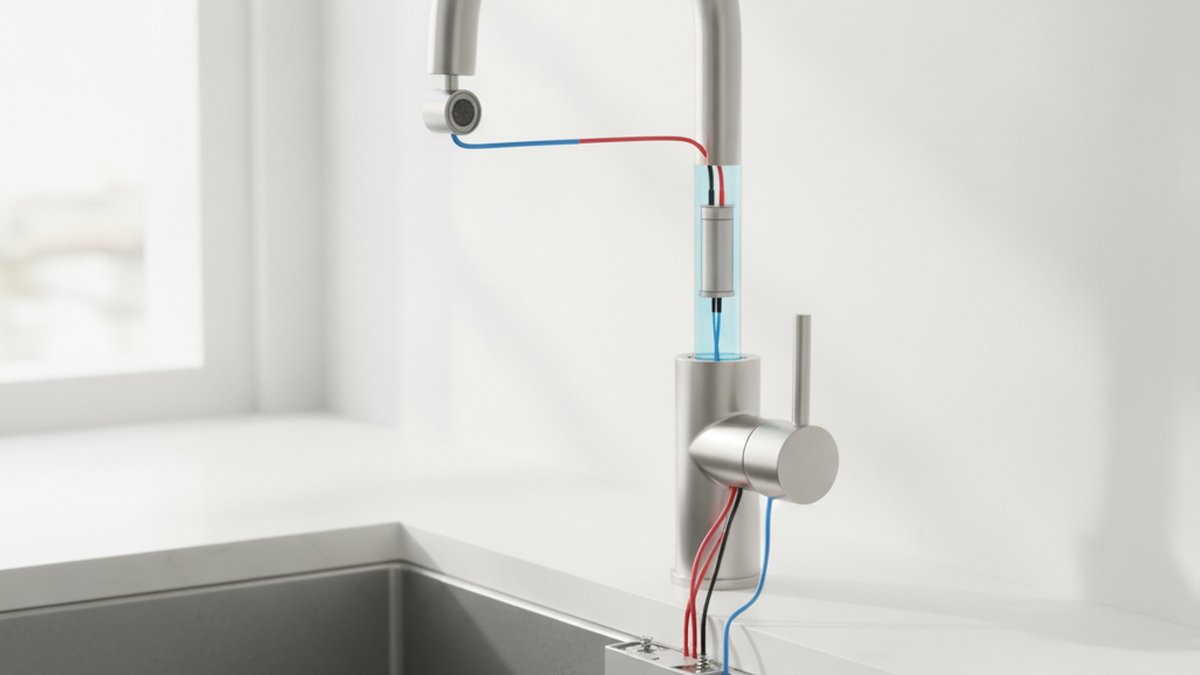
Here’s the chain of parts, start to finish, so you can picture what’s in the box you’re buying:
- Infrared (IR) sensor: usually built into the faucet spout or base. It detects your hand or a dish and sends a signal to the controller.
- DC controller box: the under-sink module with the battery compartment and circuit board. It interprets the sensor signal and decides when to open or close the water.
- Solenoid valve: an electrically operated valve on the water supply. When the controller sends a small DC pulse, the solenoid opens; remove your hand and it snaps shut. This is what actually starts and stops the flow.
- Power source: the 6V battery pack or DC adapter that feeds the whole system.
Because every electrical part runs on 6V DC, there’s no mains voltage anywhere near your water lines. That’s the core safety and simplicity advantage, and it’s why the vast majority of residential touchless faucets — including ours at WOWOW — are DC-controlled.
How long do the batteries last on a DC touchless faucet?
A good DC touchless faucet runs roughly 1 to 2 years on a single set of 4 AA batteries in a normal household — figure around 3,000–4,000 activations before the voltage drops. Heavy kitchen use shortens that; a powder-room faucet can stretch well past two years.
Battery life depends on a few real variables:
- Activation count: a busy family kitchen might trigger the sensor 30–50 times a day; a guest bathroom, a handful.
- Battery quality: name-brand alkaline AAs noticeably outlast bargain cells. Lithium AAs last even longer and handle cold cabinets better.
- Sensor “false triggers”: a sensor aimed at a shiny backsplash or a dangling towel can fire all day and drain the pack — placement matters.
Most DC controllers warn you before they die: a small LED on the spout or sensor blinks red, or the response gets sluggish, giving you a week or two of notice. If your faucet has gone fully unresponsive, fresh batteries are the first thing to try — and if that doesn’t fix it, our step-by-step guide on why a touchless faucet stops working and how to fix it fast walks through the solenoid, sensor, and wiring checks in order.
DC battery vs. AC plug-in: which touchless faucet is right for a home?
For almost every home, a DC battery-powered touchless faucet is the better choice — it installs without an electrician, keeps working in a power outage, and never needs a free outlet under the sink. AC plug-in models make sense mainly when you want to eliminate battery changes and you already have a switched, GFCI-protected outlet nearby.
Here’s the honest side-by-side:
| Factor | DC (battery) controller | AC (plug-in) controller |
|---|---|---|
| Power source | 6V — 4× AA/C batteries | 110–120V mains via low-voltage adapter |
| Installation | DIY, ~30–60 min, no wiring | Needs a free under-sink outlet |
| Works in a power outage | Yes | No (unless it has a battery backup) |
| Ongoing maintenance | New batteries every 1–2 years | None for power; check adapter |
| Best for | Most homes, rentals, remodels | Homes with existing outlet, heavy daily use |
| Typical price | $90–$300 | $150–$400 |
Some premium models give you both: a DC battery pack and an optional AC adapter, so you can plug in if you have an outlet or fall back to batteries if you don’t. If you’re choosing your first hands-free faucet, default to DC unless you specifically hate battery changes and have a convenient outlet.
What should I look for before buying a DC touchless faucet under $250?
Under $250, prioritize three things in this order: a solid brass body, a reliable solenoid valve, and a sensor with both auto and manual modes. Everything else is a bonus. Spend the money on the parts that touch water and decide flow — not on gimmicks.
Run through this checklist when you compare models:
- Material: a lead-free brass body lasts far longer than zinc-alloy. If you’re weighing the two, our breakdown of brass vs. zinc faucets explains exactly why brass wins for longevity and water safety.
- Dual control: the best DC faucets keep a normal manual handle and the touchless sensor, so you can still set temperature and run a steady stream for dishes.
- Sensor placement: a spout-mounted sensor with an adjustable range avoids false triggers from nearby walls or dish racks.
- Solenoid quality: this is the part that fails most. Look for a brand that sells the solenoid and controller as replaceable parts — you don’t want to junk a whole faucet over a $20 valve.
- Finish: spot-resist or brushed finishes hide fingerprints — ironic but true, even on a touchless faucet you’ll touch the handle.
- Certification & warranty: look for cUPC/NSF certification and at least a limited lifetime warranty on the faucet body plus 1–5 years on electronics.
Is a touchless faucet hard to install yourself?
No — a DC touchless faucet is genuinely DIY-friendly and usually takes 30 to 60 minutes with a basin wrench and an adjustable wrench. Because there’s no mains wiring, the only “electrical” step is clicking together two or three keyed plugs that can’t go in wrong.
The general flow looks like this:
- Shut off the hot and cold supply valves and clear out the cabinet.
- Drop the faucet through the sink hole and secure the mounting nut from below.
- Connect the hot and cold supply lines to the mixing inlet.
- Connect the solenoid valve in-line on the outlet, then plug the sensor cable and battery pack into the DC controller — they’re color-coded or keyed.
- Mount the controller box high and dry under the cabinet, turn the water back on, and test both auto and manual modes.
The mechanical part — mounting and the water lines — is identical to a standard faucet, so if you’ve followed our complete DIY guide to installing a kitchen faucet, you already know 80% of the job. The only additions are the controller box and the sensor/solenoid plugs. Mount the controller as high as possible under the sink so a future leak or a knocked-over cleaning bottle can’t soak it.
Why is my DC touchless faucet acting up — and how do I fix it?
Nine times out of ten, an erratic DC touchless faucet is a battery, connection, or sensor problem — not a dead faucet. Work through the cheap fixes before you assume the worst.
Common symptoms and what they usually mean:
- No response at all: dead or corroded batteries, or a loose plug at the controller. Swap batteries, reseat every connector.
- Water won’t shut off / runs randomly: the sensor is seeing a reflective surface, or the solenoid is sticking. Re-aim the sensor and clean any debris.
- Weak flow: often a clogged aerator or solenoid screen from sediment — not the electronics at all.
- Slow or laggy response: batteries near end of life. Replace the full set, never mix old and new.
The DC architecture actually makes troubleshooting easier: low-voltage parts are modular and cheap to replace. Start at the battery, move to the connections, then the sensor, then the solenoid. Our dedicated guide on fixing a touchless faucet that isn’t working covers each of these in the right order so you don’t replace parts you don’t need to.
How much does a DC touchless faucet cost, and is it worth it?
Expect to pay $90–$300 for a quality residential DC touchless faucet, with most well-reviewed kitchen models landing around $150–$220. Whether it’s “worth it” comes down to use case: in a kitchen where you’re constantly handling raw meat, dough, or dirty pots, hands-free operation pays off in hygiene and water savings every single day. In a rarely used guest bath, it’s more of a luxury touch.
Two underrated payoffs: touchless faucets cut cross-contamination (you never smear a greasy handle), and the auto-shutoff trims water waste because the stream stops the instant you pull your hand away. Over a year, that adds up in a busy household.
FAQ
Does a DC touchless faucet still work without batteries?
If it has a manual handle — and most good ones do — you can still turn water on and off by hand even with dead batteries. The touchless/sensor function won’t work until you replace the batteries, but you won’t be stuck without water. Pure sensor-only models with no manual handle will stop dispensing until powered.
Can I convert my DC battery touchless faucet to a plug-in?
Often yes. Many DC controllers have a port for an optional 6V DC adapter, so you can plug into a nearby outlet and skip batteries entirely while keeping the same low-voltage, water-safe design. Check that your specific controller lists adapter compatibility before buying one — not every model accepts it.
Is the DC controller box safe to have near water?
Yes. The whole point of a DC system is that it runs on 6V low-voltage power — there’s no mains voltage near your plumbing, so there’s no shock risk even if a small leak occurs. Still, mount the controller high in the cabinet to keep it dry and extend its life.
How do I know if it’s the controller, the sensor, or the solenoid that failed?
Isolate it step by step: fresh batteries rule out power; a blinking sensor LED that responds to your hand means the sensor is fine; if the sensor reacts but no water flows, the solenoid is the likely culprit; if nothing lights up at all with good batteries, suspect the controller or a loose plug. Because each is a separate low-voltage module, you can replace just the failed part.
Will hard water damage a touchless faucet’s solenoid?
Hard water can deposit limescale on the solenoid’s internal screen and the aerator, which shows up as weak or sputtering flow. Periodic cleaning prevents it. The fix is the same descaling you’d do on any faucet — soak the aerator and flush the screen — and it’s far cheaper than replacing parts. Brass-bodied units handle mineral-heavy water better than zinc over the long run.
Do DC touchless faucets meet plumbing codes and safety standards?
Reputable models are certified to U.S. standards such as cUPC and NSF/ANSI 61 and 372 for lead-free, drinking-water-safe construction, and the low-voltage electronics carry their own safety listings. Always confirm the certification marks on the spec sheet before purchase, and keep your receipt for the warranty.
The bottom line from our team
Author note: This guide was written by the WOWOW product team, which has spent over a decade designing, bench-testing, and supporting residential faucets. We test every touchless model’s solenoid for tens of thousands of open/close cycles and validate sensor accuracy and battery draw before a product ships. WOWOW faucets are built from lead-free brass, certified to cUPC and NSF standards, and backed by a limited lifetime warranty on the faucet body plus dedicated warranty coverage on the DC controller and electronics. If a part ever fails, we sell the solenoid, sensor, and controller individually — so a small electronic issue never means replacing the whole faucet.
Bottom line: a touchless faucet with a DC controller gives you airport-style, hands-free convenience with home-friendly, battery-powered simplicity. For most kitchens and baths, it’s the smart, safe, install-it-yourself choice — and the low-voltage design is exactly what makes it so painless to live with.
\n
Related Guides
\n
- \n
- What are The Different Types of Bathroom Faucets
- Best White Kitchen Faucets – Buying Guide & Reviews
- The Best Faucet Brands to Consider in 2026
- What is The Standard Size Hole for A Kitchen or Bathroom Faucet
\n
\n
\n
\n
\n